


The Check Point Building for the Faculty of Computer Sciences / Kimmel Eshkolot Architects

The Check Point Building for the Faculty of Computer Sciences  / Kimmel Eshkolot Architects - Exterior Photography, Facade
© Amit Geron

The Check Point Building for the Faculty of Computer Sciences  / Kimmel Eshkolot Architects - Exterior Photography, FacadeThe Check Point Building for the Faculty of Computer Sciences  / Kimmel Eshkolot Architects - Image 3 of 25The Check Point Building for the Faculty of Computer Sciences  / Kimmel Eshkolot Architects - Interior PhotographyThe Check Point Building for the Faculty of Computer Sciences  / Kimmel Eshkolot Architects - Interior Photography, Stairs, HandrailThe Check Point Building for the Faculty of Computer Sciences  / Kimmel Eshkolot Architects - More Images+ 20

Tel Aviv-Yafo, Israel
More SpecsLess Specs
The Check Point Building for the Faculty of Computer Sciences  / Kimmel Eshkolot Architects - Exterior Photography, Facade
© Amit Geron

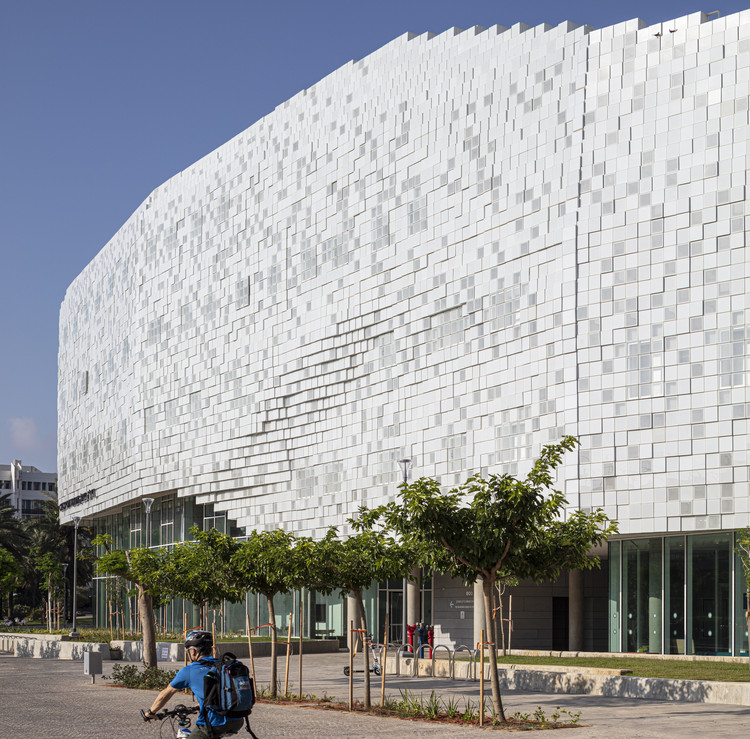
Text description provided by the architects. Located in the center of the Tel Aviv University campus, The Check Point Building is a seemingly floating volume in the campus; it contrasts the adjacent Mario Botta’s iconic Synagogue and the 1960s Faculty of Exact Sciences. The Building is a new type of technology integrated building with a unique envelope made of pixels of glass that were designed using parametric modeling, it is an innovative system matching the values ​​that the building represents.
Content Loader

Project gallery

See allShow less
About this office
Cite: "The Check Point Building for the Faculty of Computer Sciences / Kimmel Eshkolot Architects" 06 Dec 2019. ArchDaily. Accessed . <https://www.archdaily.com/929603/the-check-point-building-for-the-faculty-of-computer-sciences-kimmel-eshkolot-architects> ISSN 0719-8884

© Amit Geron

CheckPoint 计算机学院大楼,“非物质”的流动立面 / Kimmel Eshkolot Architects

You've started following your first account!

Did you know?

You'll now receive updates based on what you follow! Personalize your stream and start following your favorite authors, offices and users.